Lift Planning Support
Lift Planning Support Powerful programs make designing and doing crane work smoother, safer, and more efficient
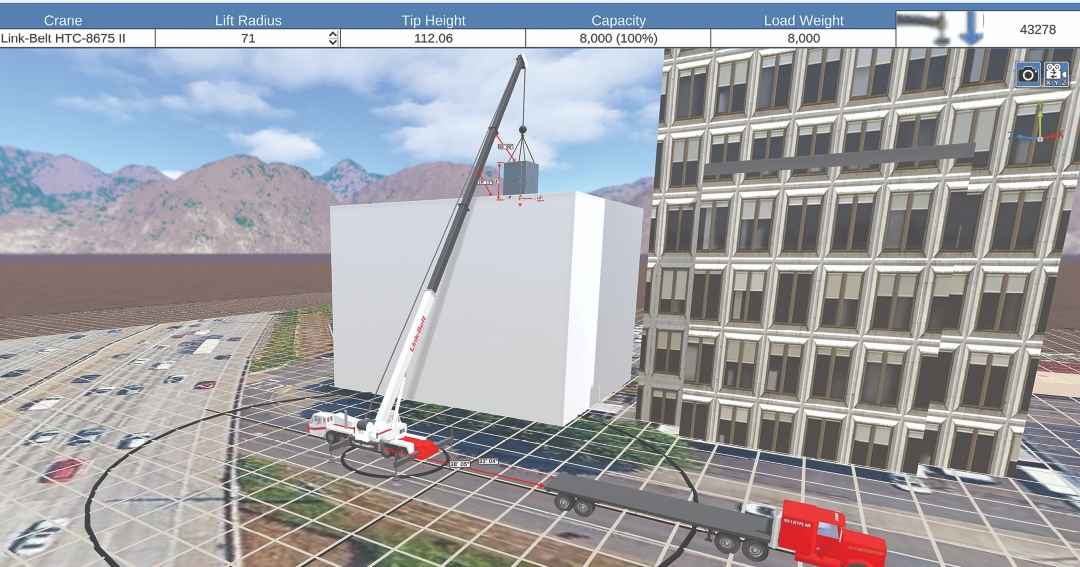
The extensive crane library of A1A Software's 3D LiftPlan includes models from many leading manufacturers in a wide range of configurations.
Lift planning software gives engineers, fleet managers, crane users, crane operators, and safety teams powerful digital tools to design, simulate, and verify lifts before equipment reaches a jobsite.
Three major companies are in the business of providing lift planning programs for U.S. crane operations.
They are A1A Software, CRANIMAX, and LiftPlanner Software.
Lift planners can purchase access to those companies’ planning programs, which generally include information about cranes from the principal manufacturers serving the U.S., including Broderson, Grove, Kobelco, Liebherr, Link-Belt, Load King, Manitowoc, National Crane, Sany, Shuttlelift, Tadano, Raimondi (formerly Terex), XCMG, Zoomlion, and others.
Link-Belt and the Manitowoc brands (Grove, Manitowoc, National Crane, and Shuttlelift) sponsor their cranes in A1A’s 3D Lift Plan, so users of that program can select those crane brands for free.
In addition, Manitowoc has a similar arrangement with CRANIMAX’s CRANEbee lift planning program.
Other crane manufacturers, including Liebherr and Tadano, have developed their own lift planning software, which they offer their customers.
Here’s a rundown of the lift planning software available to crane users in the U.S.
A1A Software
A1A Software produces 3D Lift Plan and related lift planning programs that work with a variety of crane brands.
Founder and president Tawnia Weiss talked about A1A’s lift planning programs.
General Description: A1A’s lift planning software helps crane professionals plan lifts more safely, efficiently, and accurately.
Our tools allow users to select cranes, visualize lifts in 3D, evaluate jobsite conditions, plan rigging, calculate ground bearing pressures, and create clear lift documentation.
The idea is to give users a better understanding of the entire lift before equipment arrives on site.
Key Features and Benefits: One of the biggest benefits is being able to visualize the lift before it happens.
Users can position cranes, loads, and jobsite objects; check clearances and capacities; review rigging; and identify potential problems early in the planning process.
That can improve safety, reduce costly in-field changes, and help everyone involved communicate from the same plan.
Our product suite includes tools for lift planning, rigging design, jobsite design, and sketching, so users can handle more of the planning process within one connected group of applications.
Types of Cranes: We support a wide variety of cranes, from smaller truck-mounted and knuckleboom cranes to rough-terrain, all-terrain, truck, and large crawler cranes.
Our crane library includes more than 1,700 OEM load charts from many leading manufacturers, including Link-Belt, Manitowoc, Tadano, and others.
That gives customers a lot of flexibility, especially when they operate mixed fleets.
Newest Developments: One of our biggest focuses is continuing the transition from the traditional web-based 3D Lift Plan platform to the A1A Product Suite.
The newer applications are designed to provide a more modern experience across computers and mobile devices.
We are also continuing to expand Jobsite Designer, including the new Asset Importer, which lets users bring their own 3D Computer-Aided Design (CAD) models into jobsite designs, as well as 3D Lift Vision, which can simulate lift plans in virtual reality (VR).
CRANIMAX CRANEbee
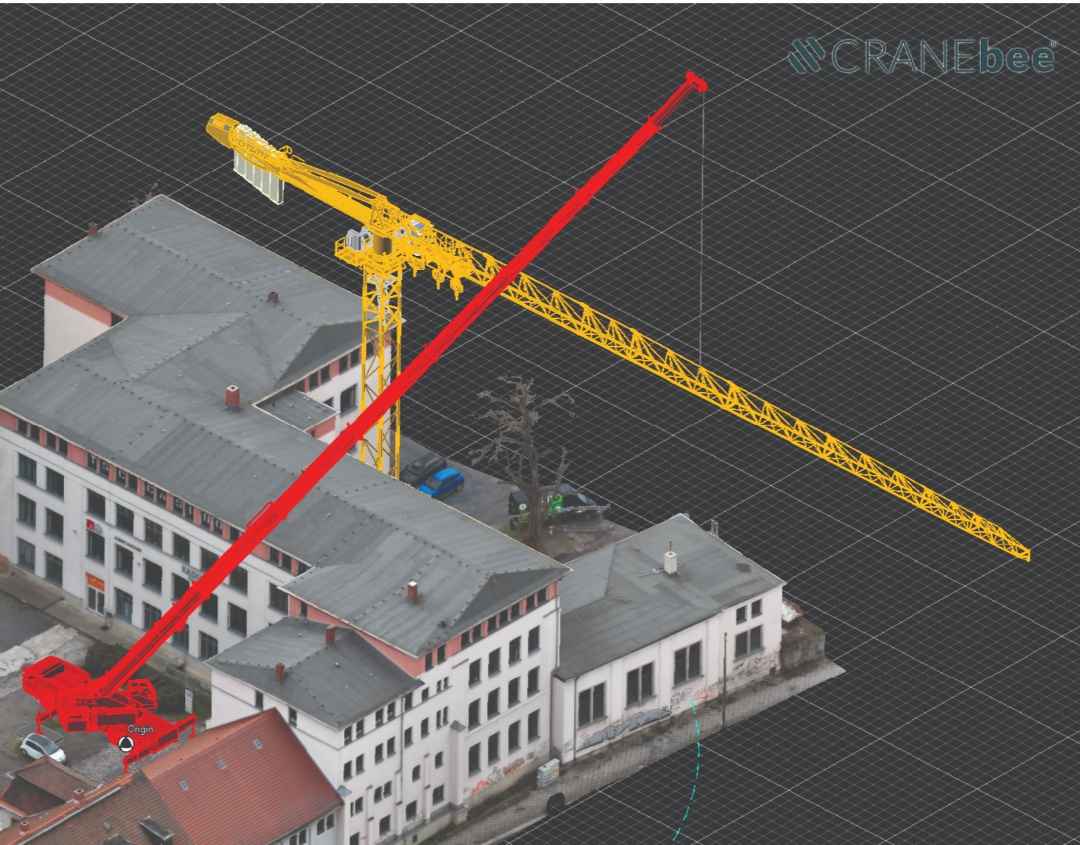
General Description: CRANIMAX CRANEbee is an advanced 3D lift planning and site-simulation software that supports the entire planning process.
From a library of more than 470 crane models and millions of configurations, it automatically determines the right crane setup for each operation.
CRANIMAX says all results are precise, fully visualized in 3D, and can be transferred seamlessly into CAD environments.
Key Features and Benefits: CRANIMAX says one of CRANEbee’s major benefits is the ease, speed, and accuracy with which it searches for the right crane and configuration based on a job’s actual requirements.
Another is its ability to compute the exact ground-bearing pressure, and immediately update the calculation as parameters change. Mat planning is also integrated.
A third important feature is CRANEbee’s ability to coordinate lifts involving up to eight cranes, and synchronize all simultaneously as the load is moved or rotated.
The RHL configurator allows rigging to be assembled visually, in real time, using predefined components. The finished rigging can be transferred to the crane, ready for use.
According to CRANIMAX, CRANEbee can import many file formats, including IFC, STEP, DWG, DXF, PDF, common image files, and even 3D site models from drone data.
There is no limit on the number of imported objects, and all can be scaled, positioned, and integrated to ongoing plans.
The company says the finished plan can be transferred to AutoCAD with a single click or exported as IFC, STEP, DXF, or 3D-PDF files.
LiftPlanner Software, LLC
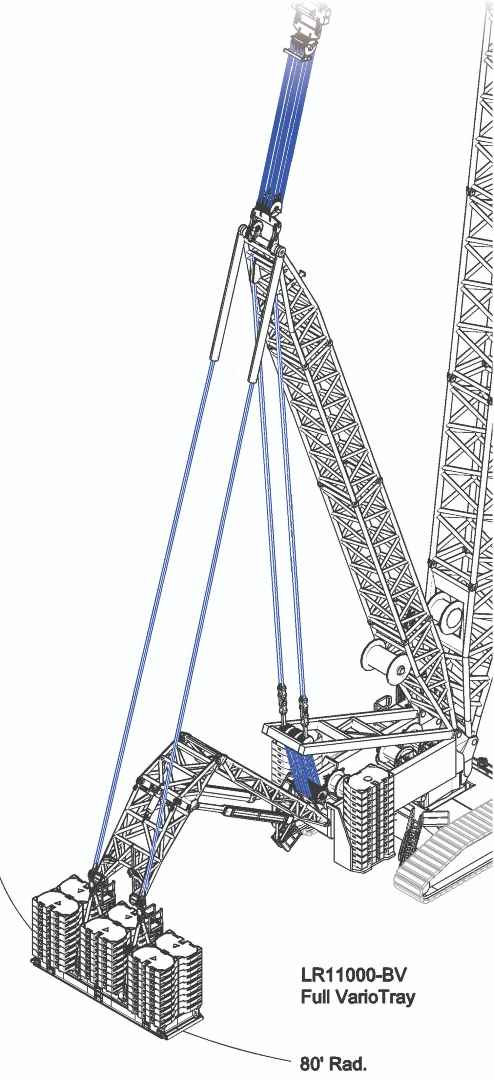
Jim Meehan, president of LiftPlanner Software, discussed key points about his company’s lift planning program.
General Description: LiftPlanner is a CAD-based, multi-manufacturer lift planning system used across North America for engineered lift studies.
It provides a full 3D environment for modeling cranes, rigging, loads, and jobsite constraints with engineering accuracy.
The software is used for feasibility evaluation, communication, and documentation of complex lifts.
Key Features and Benefits: Lift-Planner offers full 3D visualization of cranes, rigging, loads, and site conditions, which can all be integrated directly into AutoCAD for accurate modeling.
The system features detailed rigging libraries and geometry tools, and allows annotated drawings, lift sequences, and animated lift paths for clear communication that facilitates pre-lift engineering, feasibility studies, and safety reviews.
Types of Cranes: LiftPlanner works with cranes of many brands and types, including crawler cranes with variable-position counterweights (VPC) or auxiliary counterweight trays, wagons, or frames.
It also works with boom trucks, all terrain, rough terrain, carry deck, lattice boom crawler, and telescopic boom crawler cranes, as well as tower cranes, gantries, and multi crane lifts.
In addition, it can be used with platform trailers and other transporters.
That flexibility makes it suitable for mixed fleets and diverse project requirements.
Newest Developments: LiftPlanner’s ever-expanding library of cranes from several manufacturers continues to add new models and configurations, including the SL9 and SL10 attachments, Liebherr’s LR 11000 lattice boom crawler crane, continuing updates for AutoCAD 2025–2027, and ongoing improvements to rigging components and geometry functions.
Crane Manufacturers Provide Planning Programs
Many leading crane manufacturers offer lift planning software to their customers, either by developing their own programs, or through arrangements with providers such as A1A or CRANIMAX:
Liebherr
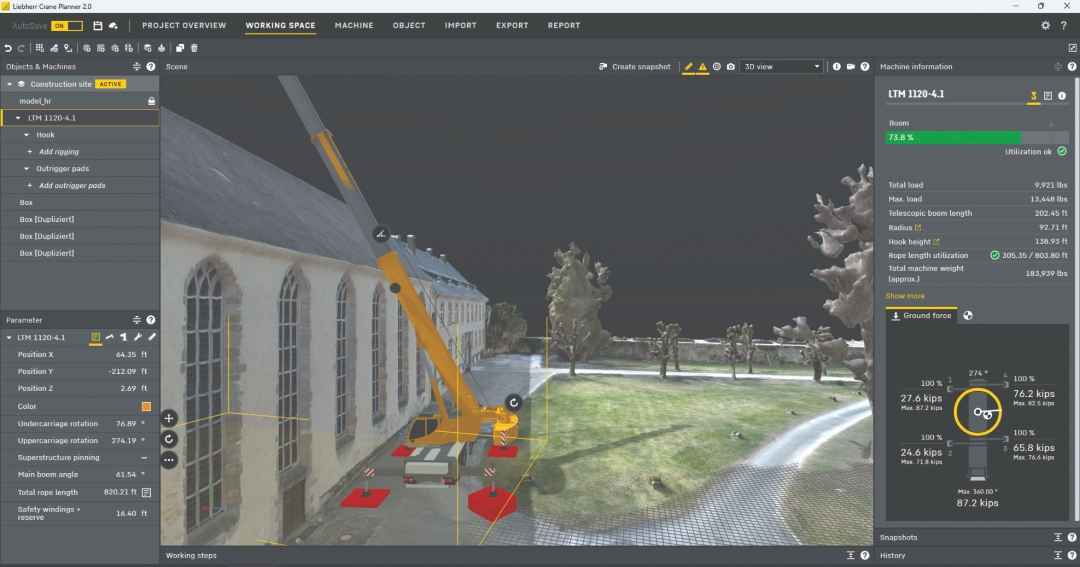
Trina E. Vieten, product manager of digital services at Liebherr, explained Liebherr’s Crane Planner 2.0.
Liebherr’s Crane Planner 2.0 is a modern, three-dimensional lift-planning tool that does not require the extensive training or hardware typically associated with CAD software.
The Windows based application allows users to upload projects to the cloud and share them with other users.
Complete load charts are imported for each machine within the program, providing quick setup of machine configurations.
Exact machine data is programed, providing all safety features and capabilities for each product, so Crane Planner provides a “digital twin” of each crane.
This enables swift, detailed, and accurate lift planning with all a crane’s key features, resulting in accurate and sound lift projects.
Liebherr’s Crane Planner 2.0 offers 3D visualization and a broad range of planning functions. Users can import and scale jobsite PDFs, customize buildings with a polygon tool, and import .obj and .dwg 3D objects. The software also provides rope-length utilization data, quick-pinning options for maximum load and boom configurations, an outrigger pad wizard, real-time ground pressure and center of gravity calculations, a rigging editor, and working steps. Additional functions support CAD export, drone-footage import, personalized lift-plan reports, and more.
Cranes in the program’s library include: Liebherr LICCON2 and up mobile cranes (LTM), rough terrain cranes (LRT), compact cranes (LTC), telescopic boom crawler cranes (LTR), lattice boom crawler cranes (LR 1400 and below), mobile construction cranes (MK), and duty-cycle (HS) models.
The full list of cranes is on the Crane Planner 2.0 website.
The most recently added capabilities are telescoping flexibility, outrigger pad custom color, and customizing of a crane’s primary color.
Newly added cranes are the MK 88-4.1E and the LTR 1220, and plans to add the LTR 1100, 1060, and 1040 are under way.
Link-Belt
Link-Belt supports lift planning by sponsoring Link-Belt cranes in A1A’s 3D Lift Plan program.
Link-Belt’s arrangement with A1A gives any 3D Lift Plan user cost-free access to every Link-Belt crane in the 3D Lift Plan library.
Manitowoc/Grove/National Crane/Shuttlelift
Bob Ritter, Manitowoc’s director of product management, talked about the lift-planning programs that Manitowoc offers to its customers, at no charge, including 3D Lift Plan and CRANIMAX CRANEbee.
Both serve the same fundamental purpose but offer different software environments and crane coverage.
Manitowoc also provides supporting tools, such as a ground-bearing-pressure estimator and an outrigger pad-load calculator.
These are more accessible tools to support lift planning, particularly when users need to assess ground conditions and outrigger loads without developing a full lift plan.
Both 3D Lift Plan and CRANIMAX CRANEbee also include crane selection. Users specify requirements such as radius, capacity, setup distance, and obstructions, and the software identifies crane configurations that can make the lift.
For VPC-equipped crawler cranes, such as the MLC300 and MLC650, the tools can also help determine counterweight position for a specific lift configuration. That information helps assess tail swing and ground-bearing pressure even before the crane arrives.
Manitowoc’s lift-planning tools cover a wide range of crane types.
CRANIMAX CRANEbee supports the full Grove GMK all terrain crane lineup, as well as the MLC300 and MLC650 crawler cranes equipped with (VPC) variable position counterweights.
3D Lift Plan supports Manitowoc crawler cranes, National Crane boom trucks, and Grove all terrain, carry deck, rough terrain, telescopic boom crawler, and truck-mounted cranes.
One of the more recent developments is the software’s ability to account for variable crane capacities based on configuration.
For example, the capacity of some VPC-equipped crawler cranes can change when using the locked counterweight function.
On other cranes, capacity can vary with outrigger span.
Lift-planning tools can help predict the resulting capacities.
Manitowoc updates lift-planning tools as new crane models are introduced and existing models are modified, so the software stays usable across the evolving product range.
Tadano America
Tadano said it offers many tools and technologies to help users plan jobs and lifts effectively and efficiently.
They all have the same goal: creating a streamlined, data-driven process that maximizes capacity, improves safety, and increases fleet utilization.
The first is Crane Select+, a fast, intuitive way to identify the ideal crane and configuration for a job.
Its minimal input requirements, advanced filtering, and ability to simultaneously evaluate many load cases help find the right crane quickly, reducing unnecessary equipment mobilization.
The Working Range tool uses advanced technologies such as IC-1 Plus, AML-F Smart Chart, and asymmetric outrigger configurations to reveal a crane’s lifting potential.
Real-time slewing-angle-dependent capacities and optimized outrigger positioning help users do more with the equipment they already own.
The Outrigger Reaction tool instantly calculates outrigger loads and ground-bearing pressures, validates support requirements, and ensures every setup is safe and efficient
3D Planner lets a Tadano user create accurate lift plans anywhere on any device.
Its intuitive online environment simplifies planning while providing the accuracy needed for complex projects.
Together, Tadano’s tools create a seamless workflow that helps contractors, lift planners, and crane operators plan faster and make lifts more safely and efficiently.
The good news is that today’s lifting-industry professionals have many ways to develop lift plans that make projects go smoother, more efficiently, and more safely.